Features
What you actually get
Every section below is built and running today. Nothing on this page is a plan, and nothing renders a live studio's data.
 Watch the two-minute tourThe app at work, with captions, so it makes sense with the sound off.
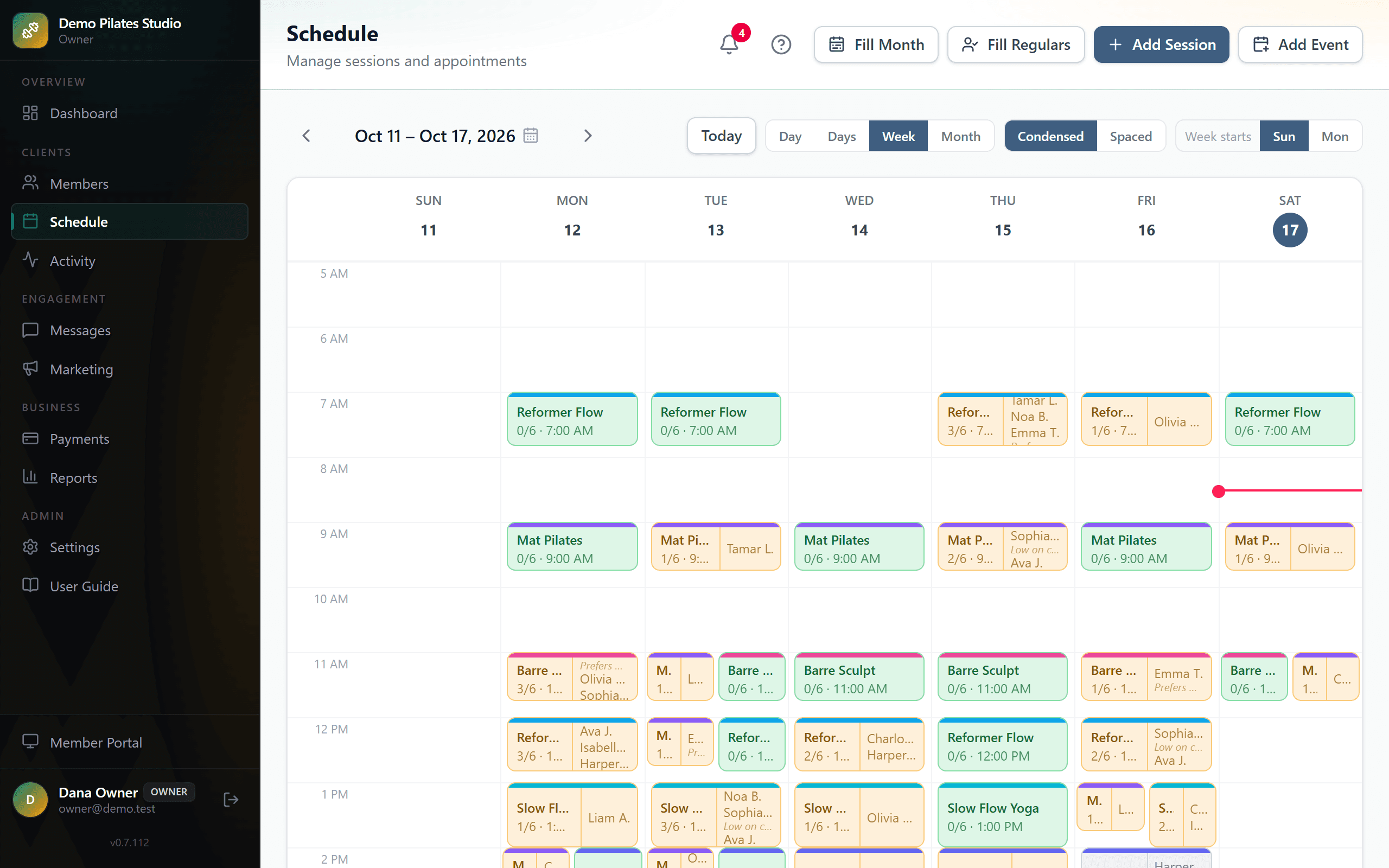
Schedule and weekly timetable
Set the shape of your week once, then generate real sessions from it — a month at a time, not one class at a time.
- A timetable per day: which times run. Fill a month of a class type from it in one go.
- Fill Month creates every session for the month from that timetable, skipping the days off you mark: a holiday, a week away. Fill Regulars skips them too, and can tell the regulars they affect, from a message you see before it goes.
- Day, Days, Week and Month views — Days shows two to six at a time, and a phone opens on three — condensed or spaced, with each class showing how many seats are taken and, when a waitlist forms, how many people are waiting. Click the date to jump to any day, months ahead.
- Your equipment count caps every class in the studio — set how many reformers, beds or bikes you have and nothing can be overbooked past it. A class open to non-members keeps its own number, because it may not be in the studio at all.
- Private sessions, and small semi-private ones: each class type holds its own number, and a private class shows only to the members booked into it. To everyone else the slot looks empty. You book people into it yourself.
- Move, cancel or add a one-off session without touching the timetable.
- Check-in, if you want it: open the class on your phone, tap people in as they arrive, close the roster. Anyone not tapped in is a no-show, correctable afterwards. Off by default — and if you never close the roster, the class settles as attended by itself.
- Nothing is written until the class is over: a booking becomes attended, and uses a session, fifteen minutes after the class ends — never the moment it starts.
Regulars who hold a standing slot
The member who always comes Tuesday at nine is booked into Tuesday at nine, without you doing it every week.
- Each member can hold preferred days and times.
- Fill Regulars books them into the matching sessions in one pass.
- Change the timetable and anyone whose slot no longer exists is listed before anything is sent.
- You choose whether to notify them, from a message you can edit first.
Waitlists that move on their own
A full class stops being a dead end.
- Members join the waitlist from the portal when a class is full — or you put someone in line yourself, from the class.
- A cancellation offers the seat to the next person, with a countdown you set — from five minutes to a week.
- Unclaimed, it passes to the person after them within about a minute of the countdown ending, rather than sitting idle.
- Overnight — 9 p.m. to 7 a.m. your time — an offer waits for morning, so nobody's runs out while they sleep. A class that starts before 7 a.m. is the exception. Set your own night in your booking rules, and offers wait for it to end instead, early classes included.
- You see the queue and can book someone in directly at any point, and the schedule shows how many are waiting for each class.
Your booking rules, kept for you
How close to class people can book or cancel, and what a late cancel costs. Set once, applied every time, and said to the member before it applies.
- A booking cut-off: nobody books a class that starts within the hours you set. A class past it stays on the schedule, greyed, with “Booking closed at 6:00 PM”, so nobody wonders where it went. You can always add someone yourself.
- Keep the night out of it, if you like: set your night, 9 p.m. to 7 a.m. say, and those hours don’t count, so nobody books your 7 a.m. class at 2 a.m. Members see the deadline on the classes it moves: “Book by 7:30 PM tonight”.
- A cancellation window: how far ahead of a class a member can cancel freely.
- Late cancels, your way: blocked, or allowed at the cost of one session, which is waived if someone takes the spot and never charged on an unlimited plan. The member is warned before they confirm, and told plainly after.
Plans, packs and family balances
Session packs, monthly plans and unlimited memberships, with the balance arithmetic done for you.
- A session comes off the plan once the class has run; cancel in time and nothing is taken.
- A pack can expire — a number of days from purchase, or from the member’s first session, which is what “three months to use them” usually means. The member is told before they pay.
- A family shares one pool of sessions between them, without double-spending it.
- Members with a low balance or an expiring plan are flagged, and can be told automatically.
- Freeze a plan while someone is away: they can’t book until you resume it, and their portal says so. Its end date stays where it was; move it with Edit dates if you’re giving them the time back.
- A date entered wrong is fixed in place — when the plan started, when it ends, the day it was paid — with no new plan and no second charge.
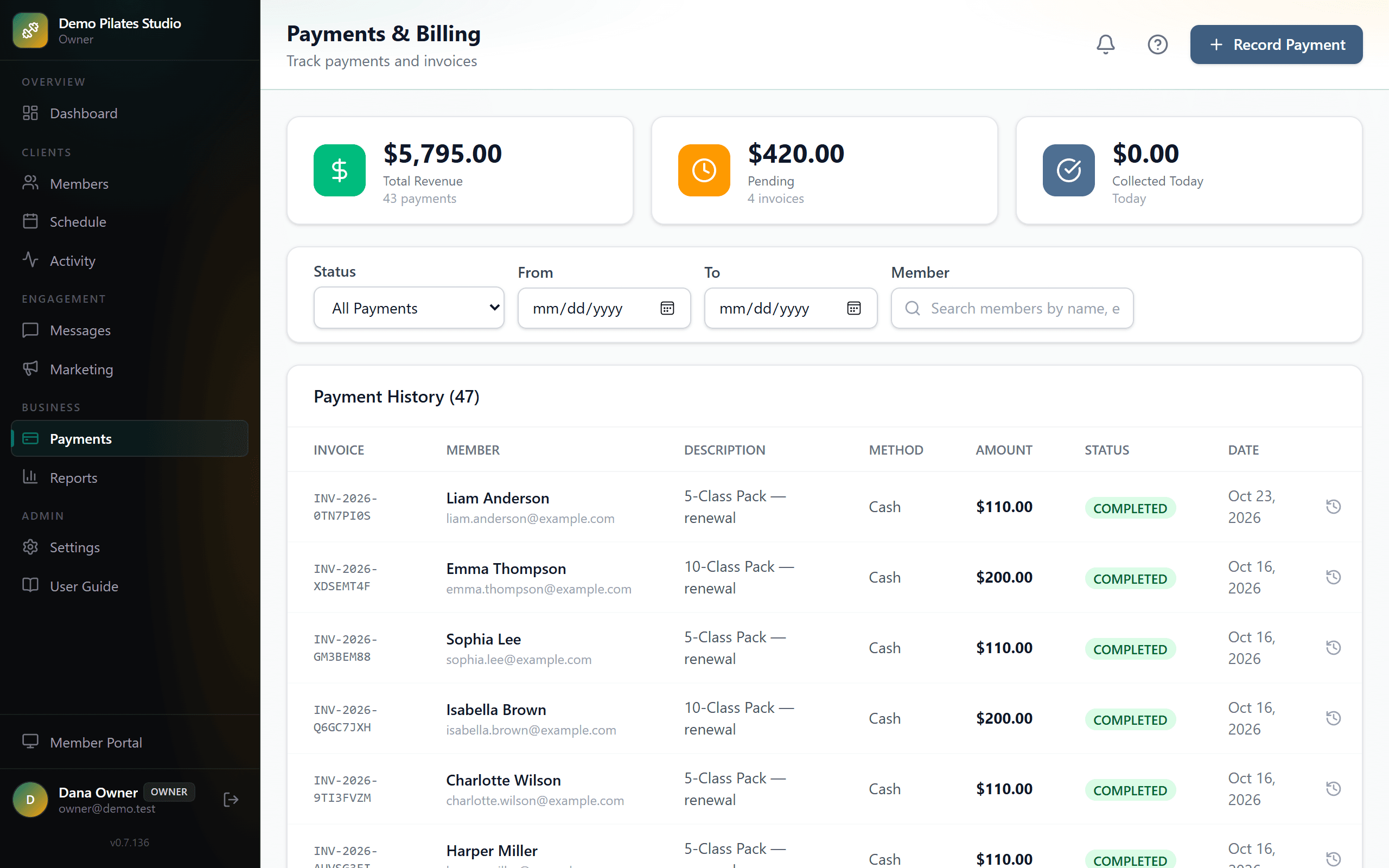
Card and cash in one ledger
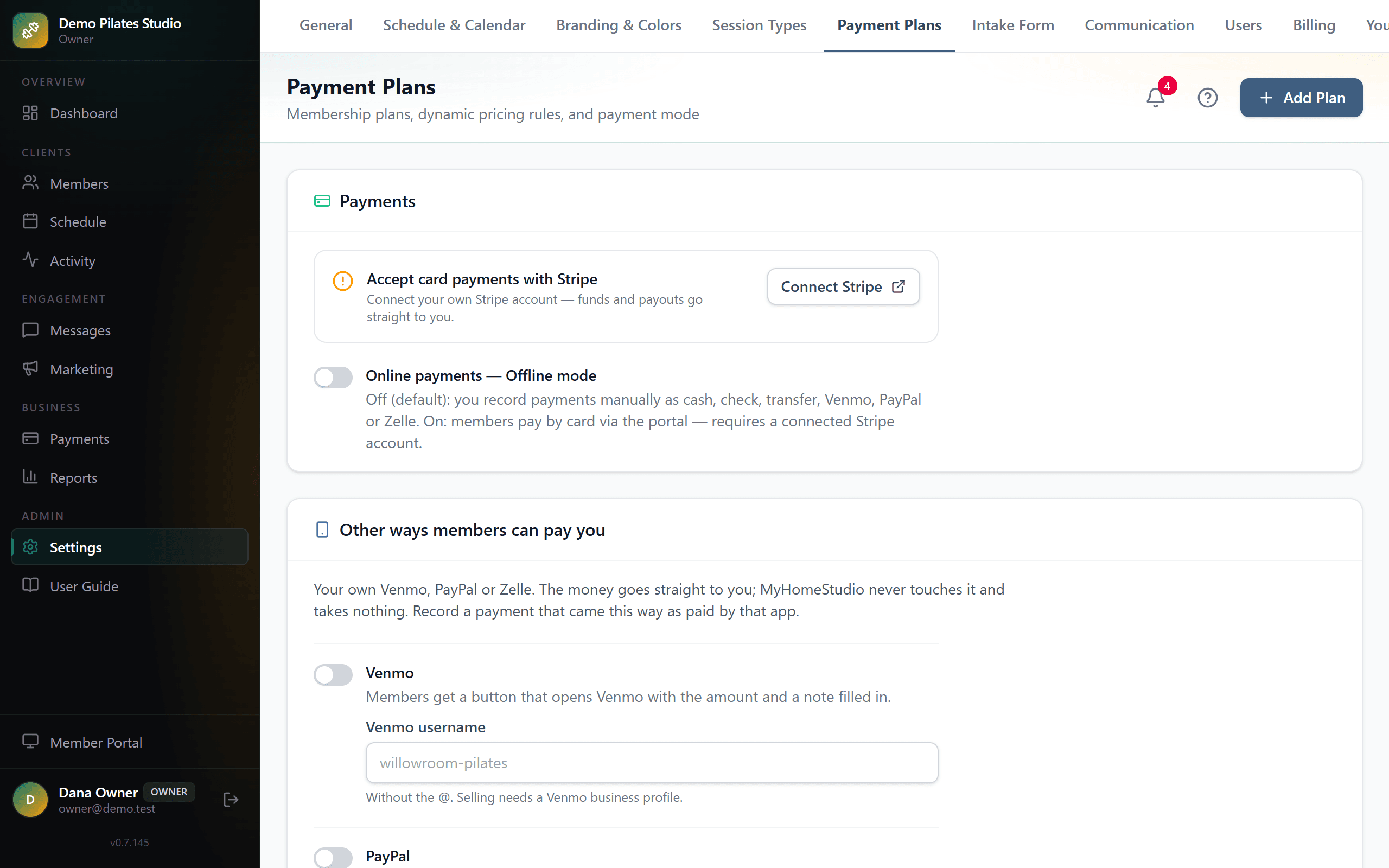
Members pay by card, or by Venmo, PayPal or Zelle, and the money lands in your own account — not ours, and we take nothing from it.
- Stripe Connect: members buy and renew from the portal, paid directly to you.
- Your own Venmo, PayPal or Zelle too, if you want them: members see what they owe at the top of their portal, and a tap opens the app with your account and the amount filled in. Zelle shows your details to copy into their bank’s app.
- They press “I’ve paid”, you’re told, and you confirm it once the money is in — or say it hasn’t arrived, and their portal asks them to check.
- Cash, check, bank transfer, Venmo, PayPal or Zelle recorded in the same ledger, so the totals are the real totals.
- Refunds, discounts and promo rules applied consistently at checkout.
- Filter by date or member, and export the lot as CSV.
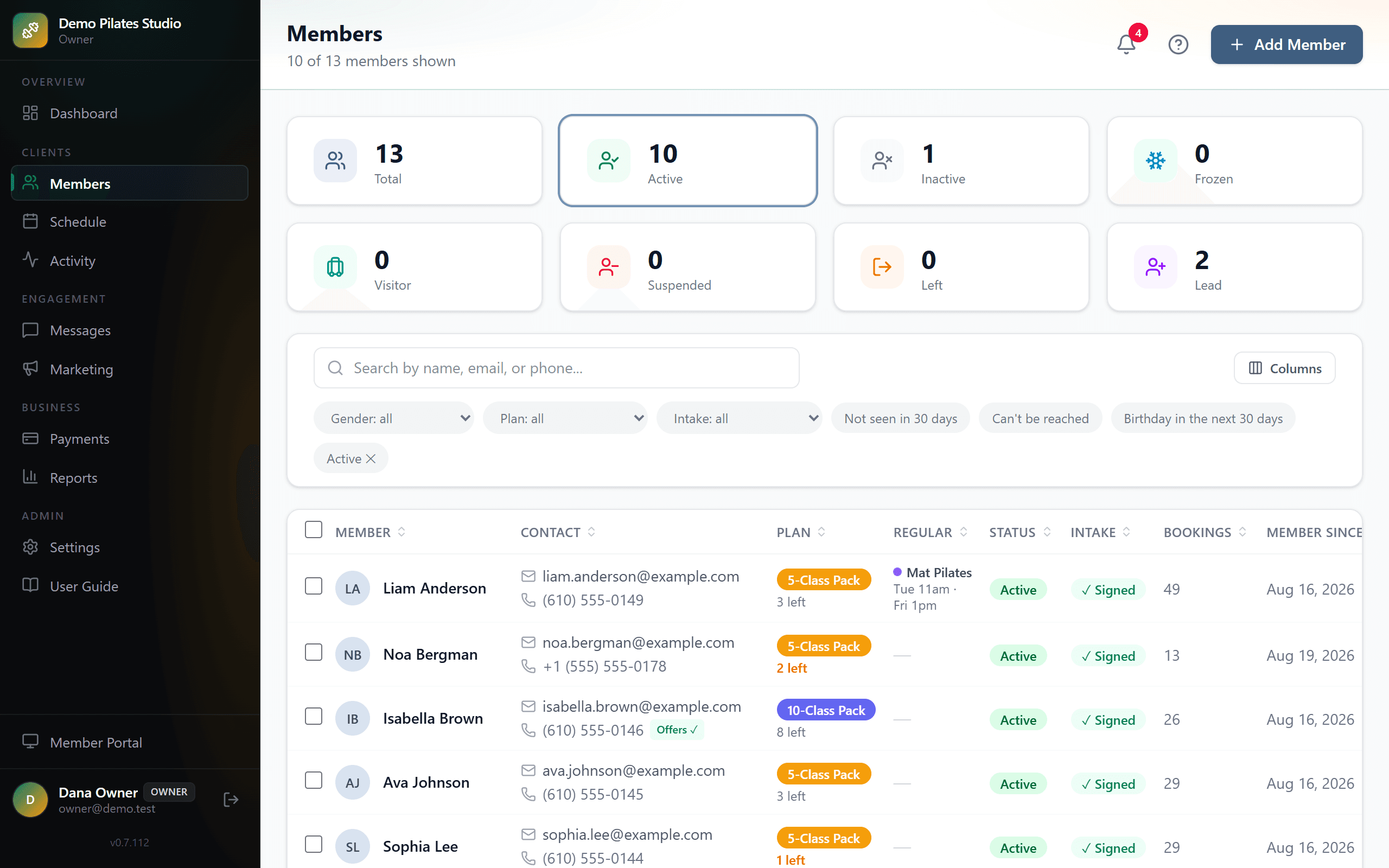
Your members, at a glance
One list with what you would otherwise keep in your head: who has sessions left, who owes you sessions, who hasn't signed your intake form, who hasn't been in.
- Filters for the questions you actually ask: low balance, owes sessions, plan ending soon, plan frozen, intake not signed, not seen in 30 days, can’t be reached by text or email, birthday coming up.
- The list keeps your filters, search and sort, so you come back from a member’s page to the list you left.
- Visitors: a short-term guest, in town for a few weeks, that you book in yourself. They don’t book in the portal, and no campaign reaches them.
- Leads, the newcomers your booking page brings in, come up in the schedule’s search too, so you can book one straight into a class.
Know what happened while you taught
You're told when someone books or cancels, and every change keeps a record of who made it.
- Choose what you’re told — a booking, a cancellation in time, a late one, a member saying they’ve paid you — and how: the bell in the app, an email the moment it happens or one summary each morning, a text (it counts toward your monthly texts), or a notification on your own phone. Your own changes never ping you.
- Texts wait for morning: what comes in overnight arrives together, in one text.
- Activity lists every booking, cancellation and change — to a class, a member, a plan, a payment or your settings — newest first, with who made it and when.
- Each class keeps its history, and each plan its sessions, so “why do they have three left?” has an answer.
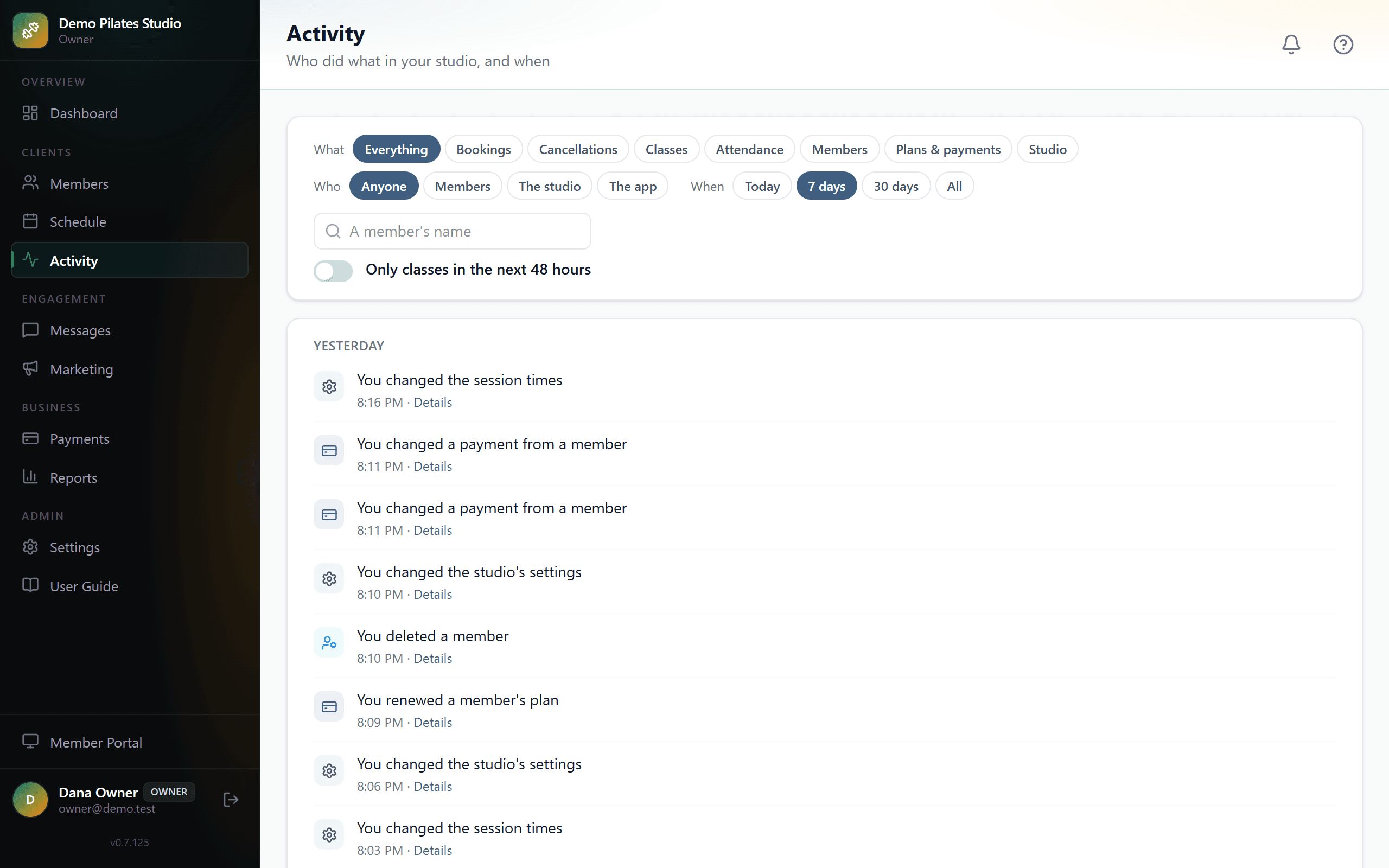
The intake form and waiver, signed and filed
Build your own form, and have it signed before a member's first class rather than chased afterwards.
- A visual builder: your sections, your questions, your wording.
- Members complete and sign it in the portal on their own device.
- The signed copy is stored as a PDF you can produce years later.
- Anyone who has not completed it is visible, and can be reminded with one button.
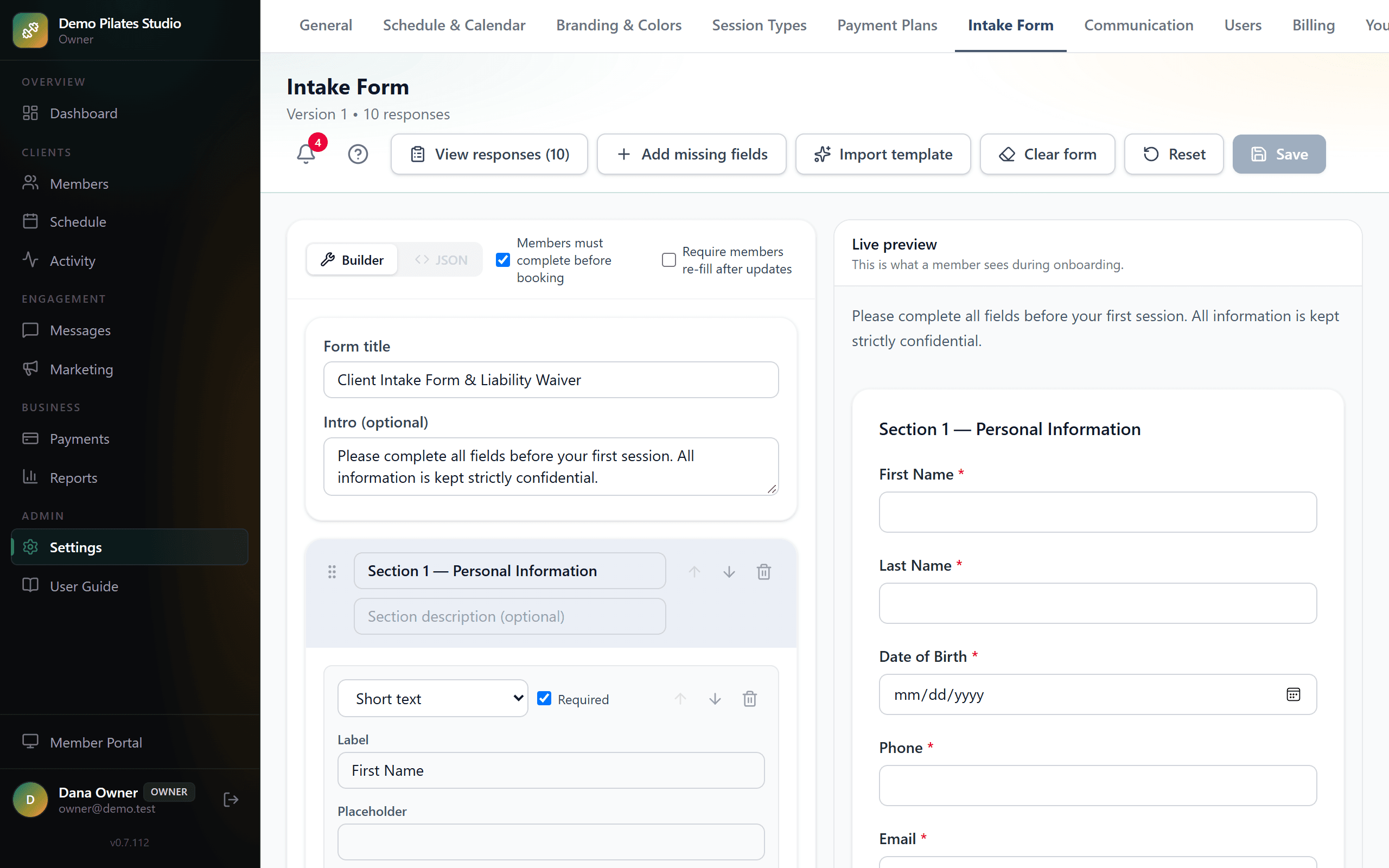
Messages that arrive, and stop when asked
Confirmations, reminders and renewal notices by text and email, from wording you control.
- Every automatic message has its own on/off switch and editable text.
- Preview any message as it will arrive: a text with your studio's name in front, its length and how many texts it takes; an email in your studio's colors.
- Class reminders go when you choose: the day before at a time you pick, or a set number of hours before. One that would land between 9 p.m. and 7 a.m. goes the evening before, at 8:30 p.m. Waitlist offers and low-balance notices that come up overnight wait for morning.
- Confirmation emails can carry a calendar invite; a reschedule updates it in place and a cancellation removes it.
- Texts carry your studio's name so members know who is writing.
- A member who replies STOP to a text gets no more texts of any kind until they reply START — the carriers’ rule, kept.
- Promotional email carries a one-click unsubscribe and leaves from its own address, so a complaint about a promotion counts mostly against that address — not the one your booking confirmations come from.
- Opt-outs, bounces and complaints tracked, so your mail keeps reaching inboxes.
- Announcements for news that isn’t a promotion — “November is open for booking”, “closed on the 27th” — reach every active member, including those who said no to offers. Never a number that replied STOP.
- Members choose in their portal whether they get reminder texts and the birthday text.
A booking page for people who are not members yet
One link, no login: a newcomer sees the classes you chose to open, books your intro offer, and turns up already on your schedule.
- Off by default. You switch it on, you decide which class types it shows, and you set the intro offer — one session, at a price or free, expiring or not.
- What a stranger sees is deliberately narrow: class, time, length, the offer. Never a member’s name, and never your street address — only somebody who has actually booked can be sent that.
- Card payments on: they pay on the page, and the seat is held while they do. Manual payments: the booking is confirmed and recorded as owed, collected at the studio — and if you take Venmo, PayPal or Zelle, their welcome email says how to pay you that way.
- A ready link for every place you post — Instagram, Facebook, TikTok, Google, your website, email and flyers, or a word of your own — each with a QR code to print. Beside each one: the leads it brought in over the last 90 days, and how many joined. No tracking pixel and no cookie: the word travels on the link.
- Newcomers arrive in your Members list as a lead, marked with the link they followed. You get an email the moment it happens.
- Texting them is opt-in, with a box they tick and a timestamp kept. A phone number on a form is not permission to text it.
- They sign your intake form at their first portal login, like everyone else. One intro per person; a returning member is pointed to their portal instead.
- After the intro class, the next step is theirs: they pick a plan in their portal — paid by card, started now and paid at the studio, or sent to you as a request, whichever you choose — and they are a member the moment they have it.
Bring people back, and see who came
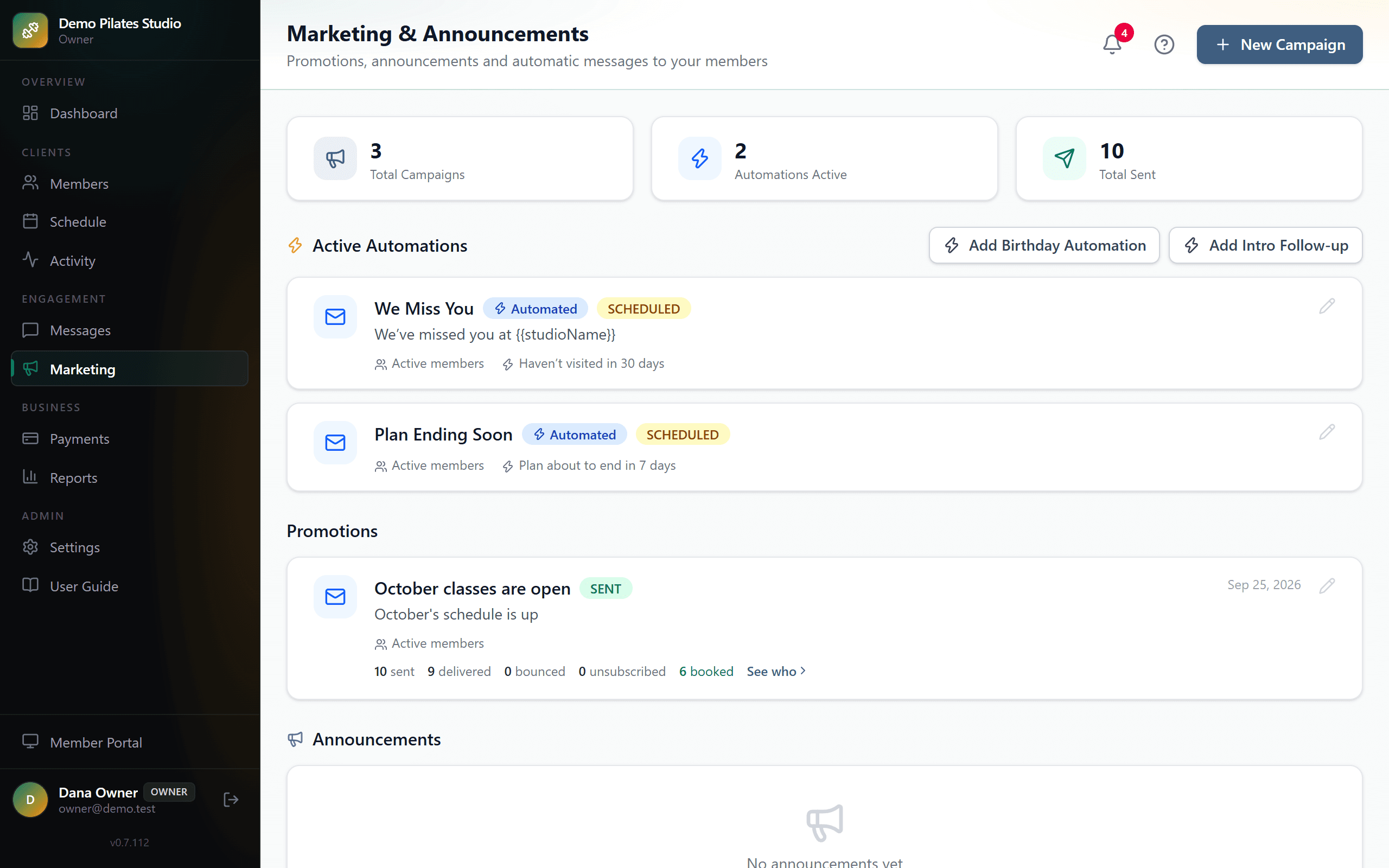
Four automations that work while you teach, campaigns for a quiet week, and for every message a record of who booked after it.
- Turn intro visitors into members: three days after their intro class, a newcomer gets an email with a “Choose a plan” button — once.
- Win back the ones who drift: a “we’ve missed you” when someone has been away as many days as you choose. Once per absence, and never to anyone already booked.
- Renewals before the gap, not after: a heads-up before a plan runs out, by email and text, with a “Renew your plan” button.
- A reason to come in: a birthday note with a “Book a class” button.
- Fill a quiet week: a campaign by email or text to everyone, to active or inactive members, or to your leads.
- Know what worked: every campaign and automation shows who booked, renewed or joined within a week of it, by name. No open rates — they can’t tell you whether anyone came back.
- Each automation switches on in one click with wording you can edit, and says its thing once per event — not every morning until the person gives up on you.
A member portal that installs like an app
Your members get a page that behaves like an app, without an app store.
- Book, cancel and join waitlists; see what is left on their plan.
- Save any booked session to Google, Apple or Outlook calendar in one tap.
- Buy and renew by card, if you have Stripe connected, or pay what they owe by Venmo, PayPal or Zelle, if you take them.
- Add it to a phone's home screen — no download, nothing to update.
- Sign in with a code sent by text, so there is no password to forget.
Calendar sync
For you, the owner: your classes in the calendar you already keep, or that calendar's commitments on the studio's schedule — whichever direction you choose.
- Subscribe to your sessions from Google Calendar, Apple Calendar or Outlook, through a private link you can regenerate at any time.
- Or bring your personal calendar in: the school run and the dentist show on the studio schedule beside your classes, so you never plan one on top of them. Members never see them.
- Block time by hand as well — once, or repeating every day, every week on the days you choose, every two weeks or every month. Change one, the rest, or all of them later, as in Google Calendar.
- No account access asked for in either direction: a link out, a link in, and nothing written to your Google or Apple account.
Reports, and your data on your terms
Enough numbers to run the business, and everything you have entered, downloadable without asking.
- Revenue by month and by plan; bookings by class type.
- Attendance and capacity, so you can see which times are worth keeping.
- New members over time.
- Settings → Your data: one button downloads the whole studio — members, plans with remaining sessions, bookings, payments and every intake answer — as spreadsheets you can open anywhere. Yours, whenever you want it.
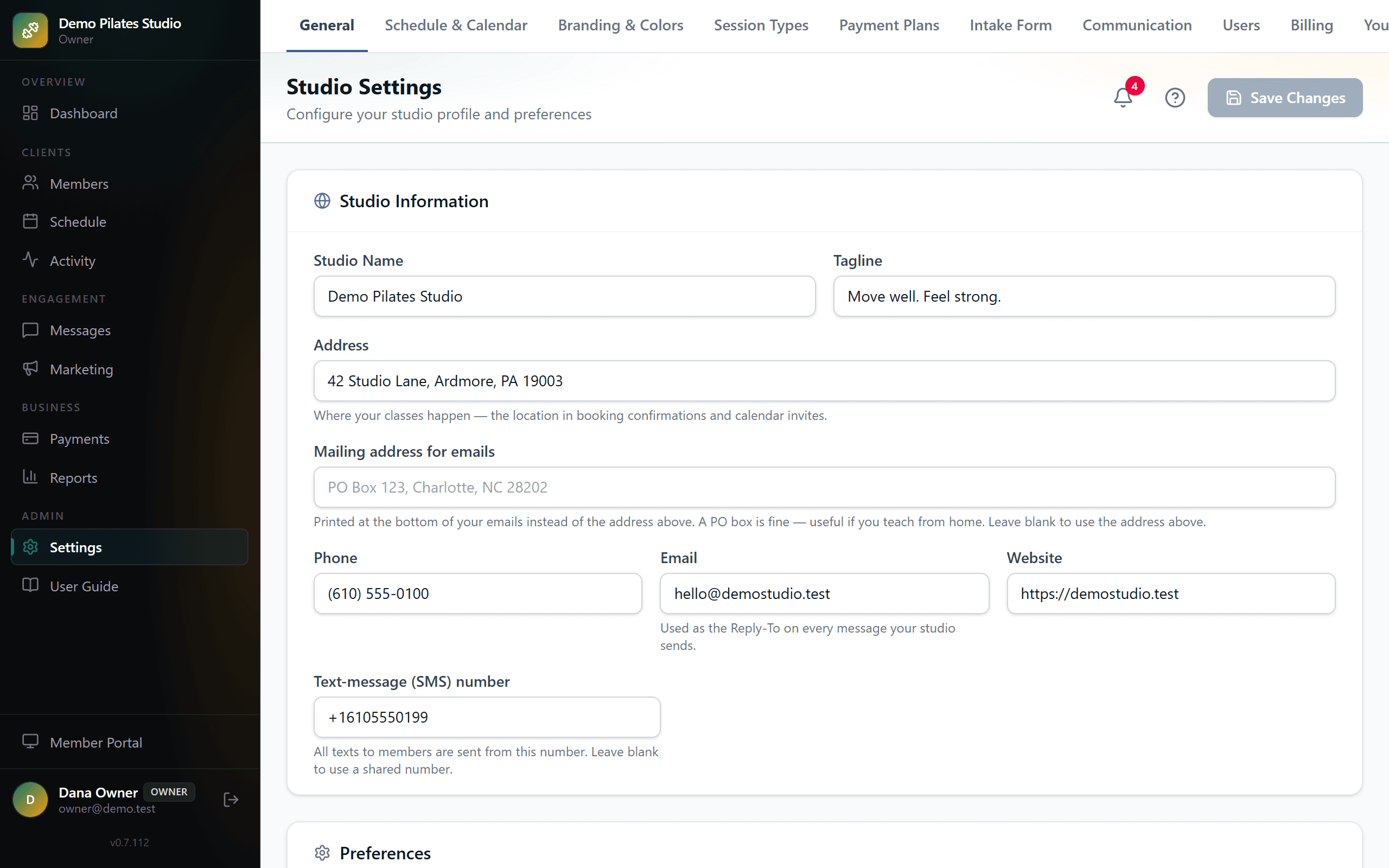
Send me your prices. I'll do the rest.
I'll set up your classes, plans and intake form, and send you a link to look around. No call needed. If it isn't right for your studio, I'll say so.